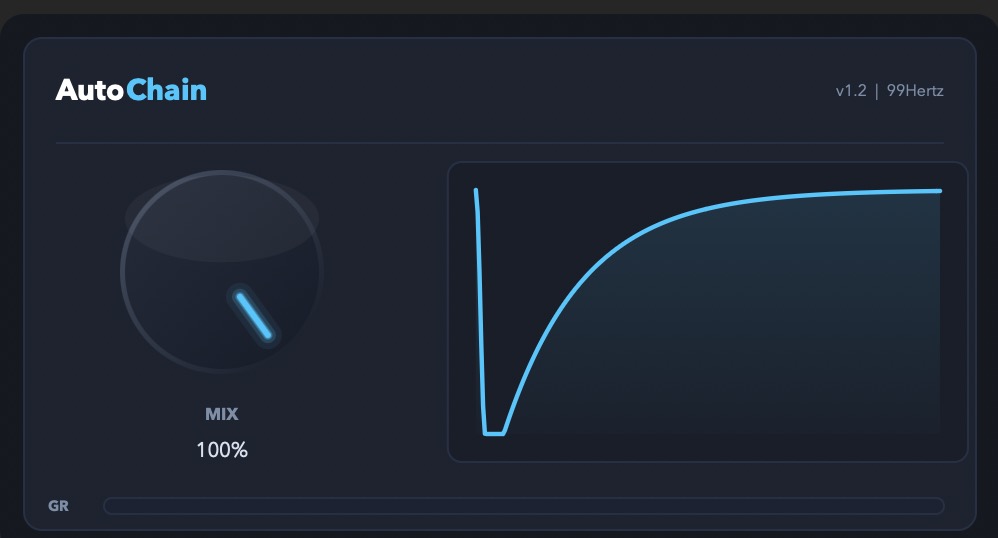
You know that bouncy, breathing sound in house music — where the bass seems to duck every time the kick hits, then bounce back up between beats? That's sidechain compression. It's in almost every tech house, speed garage and minimal house track you've ever heard.
Once you know what it is, you'll hear it everywhere. And once you learn how to do it, your tracks will feel like real house music instead of a flat, lifeless mix.
What Is Sidechain Compression?
Sidechain compression is when one sound controls the volume of another. Usually the kick drum is in control. And the bass, pad or synth is the one being compressed.
Here's what happens: every time the kick hits, it sends a signal to a compressor on another channel. That compressor ducks the volume of that channel for a moment. Then the volume bounces back up before the next kick comes in.
The result? Everything breathes with the kick. Bass ducks when the kick hits, then comes back in the space between beats. That's the pumping sound.
Why Does It Sound Like That?
Think about being in a club. The bass is shaking your chest. The kick drops — and for a split second, the bass backs off, letting the kick cut through. Then the bass rushes back in before the next beat. You feel that.
That's not a happy accident. The producer put it there on purpose.
Sidechain compression creates space. Without it, the kick and bass fight each other in the low end. Both are loud, both are sitting in similar frequencies, and neither sounds right. Everything becomes a wall of sound.
Sidechain compression tells the bass to step back when the kick is speaking. That movement — that back-and-forth — creates a groove. It makes the track feel alive. It's what separates a mix that sounds like a bedroom demo from one that sounds like a club record.
Listen to any Chris Stussy, Cloonee, or Prospa track. That bouncing, hypnotic bass? Sidechain compression at work. Listen to older UK garage — Todd Edwards, So Solid Crew — and you'll hear a different kind of duck, tighter and more percussive. Same idea, different feel. The technique is the same. The settings are what change.
How It Actually Works
A normal compressor listens to the audio on its own channel. When that audio gets louder than a set level (the threshold), it turns the volume down.
A sidechain compressor does something different. Instead of listening to its own channel, it listens to a different signal — the kick drum. So the compressor only reacts when the kick hits, regardless of how loud the bass or pad is by itself.
The kick tells the compressor when to act. The compressor squashes whatever channel it's sitting on.
The controls that matter
Attack — how fast the compressor reacts after the kick hits. A slow attack (10–30ms) lets the initial punch of the kick come through before compression kicks in, which keeps the kick sounding natural. A fast attack (1–5ms) ducks the volume almost immediately, creating a sharper pump.
Release — how fast the volume bounces back up. This is where the groove lives. A longer release (200–400ms) creates a slow, rolling pump. A shorter release (50–100ms) creates a tighter, snappier duck. The release needs to match your BPM — if it's too long, the bass hasn't come back before the next kick hits. If it's too short, you get a choppy, unnatural sound instead of a groove.
At 130 BPM tech house, I usually start at around 150–200ms and adjust from there. At 138 BPM speed garage, slightly faster — around 100–150ms.
Ratio — how much the volume gets turned down. A ratio of 4:1 is a solid starting point. Higher ratios (8:1, 10:1) create a more aggressive pump. Lower ratios give a subtler, more natural movement.
Threshold — the level at which compression starts. Lower the threshold to compress more. Raise it to compress less. Start with it fairly low and bring it up until the pump feels right — you want movement, not silence.
Get AutoChain — free
The free sidechain plugin built for house music. Drop it on your bass or pad and the pump is there in seconds — no routing, no setup.
Download free →What to Sidechain (And What to Leave Alone)
Not everything needs the sidechain treatment. Here's where it actually makes sense:
- Bass channel — the most common target. Bass and kick live in the same frequency space. Getting the bass to duck when the kick hits gives both room to breathe.
- Pads and chords — sidechaining a pad creates a rhythmic pulse that fills out the groove. Very common in minimal tech house and deep house. The pad becomes part of the rhythm even though it's holding a chord.
- Synth stabs — works well in build sections where you want everything to pulse together before a drop.
What you generally don't need to sidechain:
- Hi-hats and cymbals (they live in the high frequencies, far away from the kick — they don't clash)
- Vocals (sidechaining vocals kills the energy unless you're deliberately going for that pumping vocal effect)
- The kick itself (sidechaining the kick to itself is a common mistake — it compresses when it hits, which kills the transient you're trying to keep)
Common Mistakes
Too much compression. If the bass completely disappears when the kick hits, you've gone too far. You want movement — not silence. Raise the threshold or lower the ratio until you can still hear the bass when the kick plays, just quieter.
Wrong release time. This is the most common mistake I see. If the release is too long, the bass hasn't come back by the time the next kick hits — everything sounds muffled and hollow. If it's too short, the duck happens so fast it sounds like a glitch. Adjust the release until the bounce feels natural. It should groove, not chop.
Sidechaining too many channels. When everything in the mix is pumping, nothing stands out. Pick one or two elements — usually the bass and maybe one pad — and leave the rest untouched. The pump should be felt in the low end, not heard on every single channel.
Getting the routing wrong. In most DAWs, setting up a sidechain compressor involves a routing step that's easy to mess up. If the compressor is listening to itself instead of the kick, you'll just get uneven compression — not the pumping effect you want. Check that the sidechain input is set to the kick channel, not the default "self" option.
The Easiest Way to Get the Pump
Setting up sidechain compression manually takes a few steps — and the process is different in every DAW. Ableton, FL Studio, Logic Pro all handle the routing differently. It's not complicated once you know it, but it takes a while to learn for each DAW.
That's why I built AutoChain. It's a free plugin that creates the sidechain pump without any routing. Drop it on your bass or pad channel, sync it to your BPM, and the pumping effect is there immediately.
No sidechain input. No kick send. No routing. Just the pump.
I use it on every tech house and speed garage track I make. The groove is locked in from bar one, and I can tweak the depth and speed while the music plays — much faster than dialling in a compressor by hand.
The free sidechain plugin for house music
Built for tech house, speed garage and UK garage. Free to download — works in any DAW on Mac and Windows.
Get AutoChain free →Where to Start
If you want to set it up manually, here's where to begin:
- Put a compressor on your bass channel.
- Set the sidechain input to your kick drum.
- Start with ratio 4:1, attack 10ms, release 200ms.
- Lower the threshold until you can hear the bass duck when the kick hits.
- Adjust the release until it grooves — it should breathe with the track, not chop.
Or skip straight to the pump. Download AutoChain free — drop it on the channel, sync to BPM, done.
Sidechain compression sounds technical but it's really just about feel. Trust your ears. If the track makes you want to move, the sidechain is working.