Free Plugin — Mac & Windows
AutoDrums
Counter snares and hats in house music are tedious to program by ear. AutoDrums handles it — hit Random, dial in swing and variation, and make house drum patterns in seconds.
AU · VST3
Plugin formats
Mac & Windows
Platform
4 + 4 Lanes
Sequencer
Free
Price
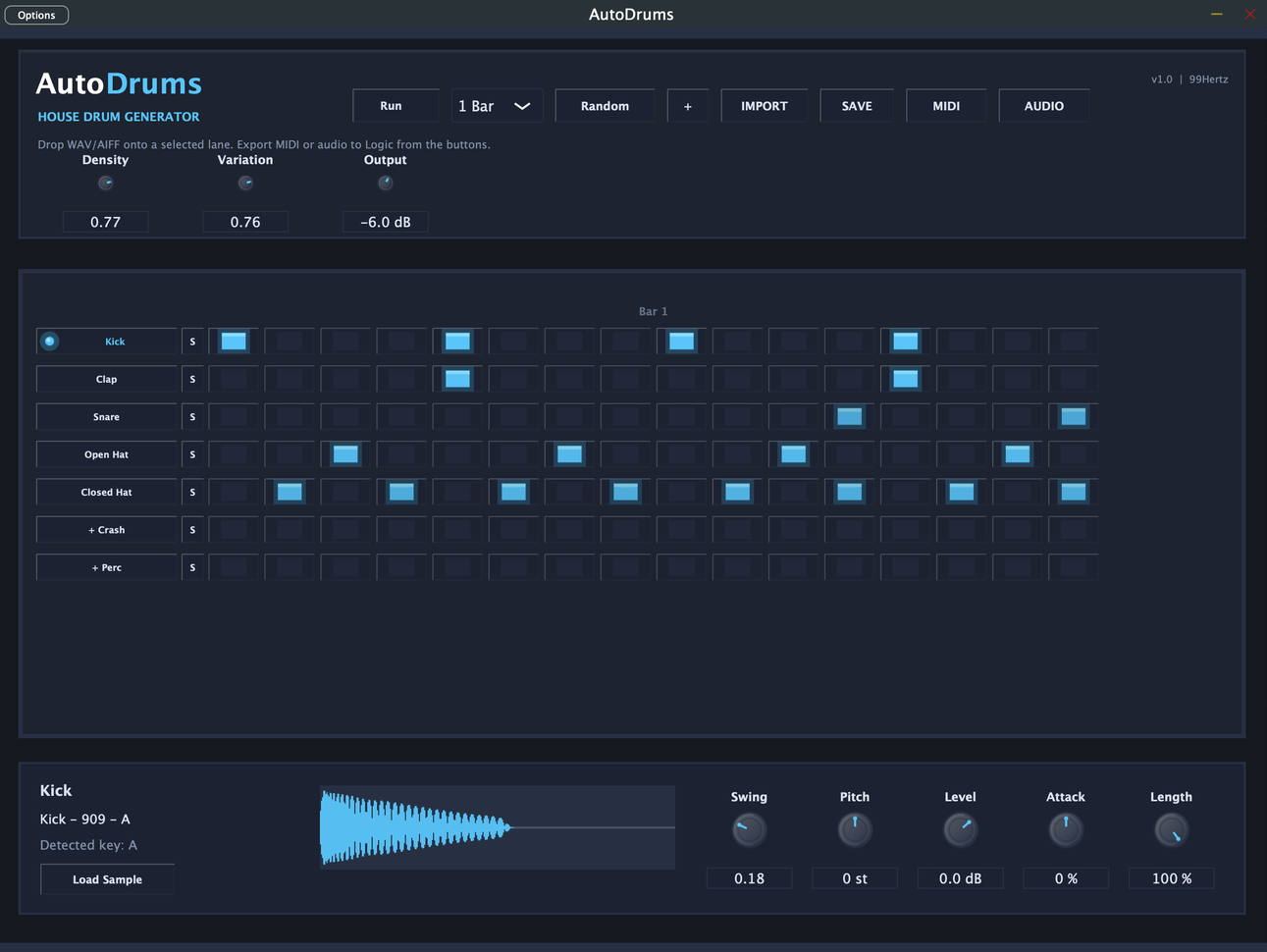
The Plugin
Hit Random. Hear a pattern.
Tweak from there.
Four core lanes — kick, clap, snare, hat — plus four extra you can add. The Random button fills them instantly. Density and variation let you pull it back until it feels right.
Features
Everything you need.
Nothing you don't.
Random Pattern Generator
One button fills all lanes with a house-appropriate pattern. Counter snares, shuffled hats, sparse claps — generated in a click, not programmed step by step.
Density & Variation
Density controls how many steps fire. Variation controls how much the pattern shifts each loop. Wind them back until the groove breathes.
Drop Your Own Samples
Drag any WAV or AIFF onto a lane. Control pitch, level, attack and length per sample. Works with your own library or the built-in 909-style voices.
1, 2, 4 or 8 Bars
Switch pattern length to fit your arrangement. Longer patterns mean more movement and variation without touching the controls.
MIDI & Audio Export
Drag the MIDI button straight into your DAW timeline, or export audio. Get the pattern out of the plugin and into your session.
AU & VST3
Works in Ableton, Logic, FL Studio, Cubase, Studio One — loads as an instrument track and outputs MIDI or audio straight into your session.
How It Works
Up and running in 60 seconds.
Step 01
Install the plugin
Run the installer. AutoDrums shows up in your DAW's plugin list automatically.
Step 02
Drop it on a track
Load AutoDrums as an instrument in your DAW.
Step 03
Hit Random
One click fills all lanes. Adjust density and variation to taste. Drag in your own samples if you want.
Step 04
Export to your session
Drag the MIDI button into your timeline, or export audio. Done.
Specs
System Requirements
| Plugin Formats | VST3, AU |
| macOS | 10.13 (High Sierra) and above — Apple Silicon & Intel |
| Windows | Windows 10 / 11 (64-bit) |
| Supported DAWs | Ableton Live, Logic Pro, FL Studio, Cubase, Bitwig, Studio One |
| Sequencer | 4 core lanes + 4 expandable — kick, clap, snare, hat and more |
| Pattern length | 1, 2, 4 or 8 bars |
| Price | Free |
| Licence | Personal & commercial use |
Download
Get AutoDrums.
Enter your email and download links for Mac and Windows land in your inbox straight away.