Free Plugin — Mac & Windows
AutoBuild
Automating a riser by hand — filter sweep, delay throw, reverb tail, all rising into the drop — takes ages and it's different every time. AutoBuild does it for you. Set the bar length, hit play, and it builds every cycle automatically, locked to your DAW's tempo.
AU · VST3
Plugin formats
Mac & Windows
Platform
1–32 Bars
Build length
Free
Price
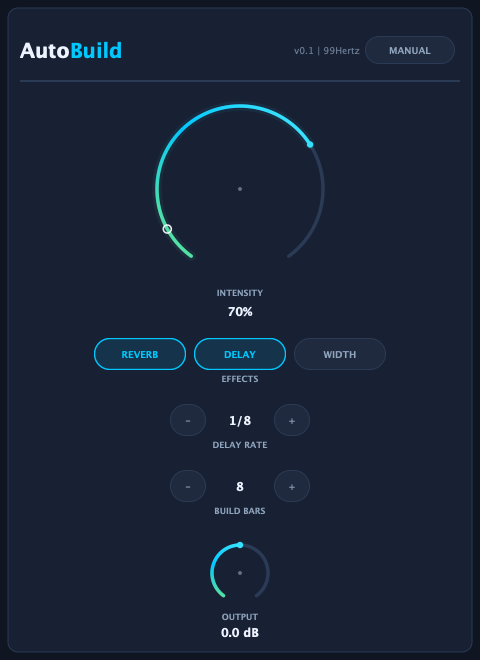
The Plugin
Set the bars. It builds itself.
Every cycle, automatically.
One knob sets how many bars the build takes — 1 to 32. AutoBuild locks to your DAW's actual bar grid, so bar one of every cycle lines up with bar one of your session. Stop and restart and it just re-syncs — nothing to reset.
Features
Everything a riser needs.
Nothing you have to automate.
Auto-Build, Bar-Synced
Pick 1–32 bars and AutoBuild climbs from silence-adjacent to full intensity every cycle, locked to your DAW's actual bar position — not a free-running clock that drifts.
One Knob: Intensity
Intensity is the amount — no separate dry/wet knob to juggle. In Auto mode it's the ceiling each build climbs to; flip to Manual and it's a live riser you can ride by hand.
Low-Cut Sweep, Always On
The core of the build: a filter that sweeps up and thins the sound out as intensity rises — the classic riser hollow-out, right before the drop.
Delay, Reverb & Width
Three independent toggles stack on top of the sweep. Delay is tempo-synced (1/2 down to 1/32). Reverb kicks in on the top of the curve. Width spreads it out. Mix any combination.
Manual Override
Want to ride the build live instead of looping it automatically? Flip Manual Override and Intensity becomes a direct real-time control.
AU & VST3
Works in Ableton, Logic, FL Studio, Cubase, Bitwig, Studio One — drop it on any bus or track as an insert.
How It Works
Up and running in 60 seconds.
Step 01
Install the plugin
Run the installer. AutoBuild shows up in your DAW's plugin list automatically.
Step 02
Drop it on a bus
Load AutoBuild as an insert on the track or bus you want to build into the drop.
Step 03
Set Build Bars
Pick how many bars the build should take. Toggle Reverb, Delay and Width to taste.
Step 04
Hit play
It builds every cycle on its own, synced to your session. Done.
Specs
System Requirements
| Plugin Formats | VST3, AU |
| macOS | 10.13 (High Sierra) and above — Apple Silicon & Intel |
| Windows | Windows 10 / 11 (64-bit) |
| Supported DAWs | Ableton Live, Logic Pro, FL Studio, Cubase, Bitwig, Studio One |
| Build length | 1 to 32 bars, tempo & bar-synced |
| Effects | Low-cut sweep (always on), Delay, Reverb, Width |
| Price | Free |
| Licence | Personal & commercial use |
Download
Get AutoBuild.
Enter your email and download links for Mac and Windows land in your inbox straight away.